Teaching & Learning

October - Pathways to Progress

Updates from Digital Learning, Personalized Learning, and Libraries

AI to Support Student Discourse

“I want my students to engage in more academic discourse, but I can’t always come up with good questions to ask them so they think more deeply about the content.” - Klein Teacher

MagicSchool has a tool for you! Check out the DOK Questions tool to create higher-level questions that will challenge your students. Save time by using this to generate ideas and then refine them to fit what you need in your content.

Click on the video link to watch a demonstration of how the tool works. Click here for a one-pager with step-by-step directions.
MagicSchool Moments

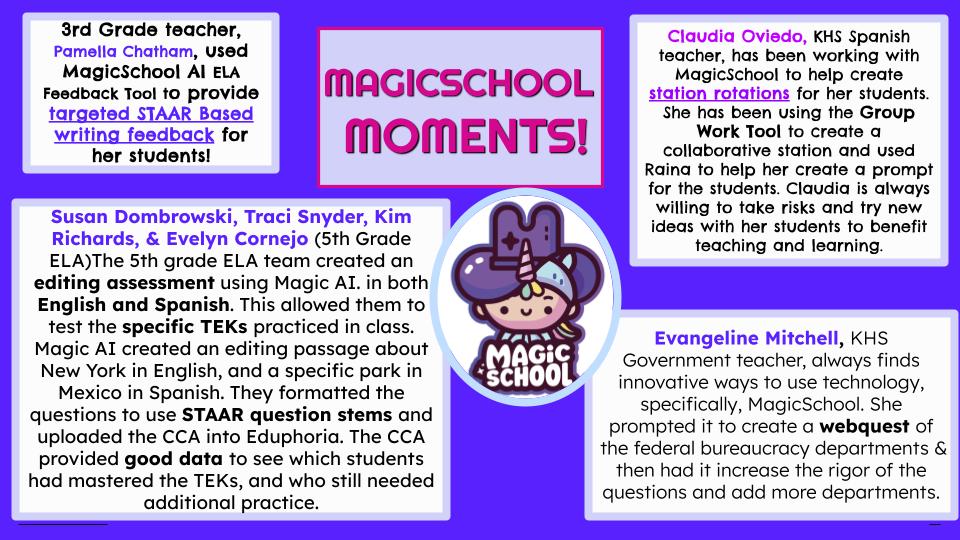
A newsletter-style graphic titled "MagicSchool Moments!" featuring several teacher highlights. Top left: 3rd grade teacher Pamella Chatham used MagicSchool AI ELA Feedback Tool to provide targeted STAAR-based writing feedback. Bottom left: 5th grade ELA team (Susan Dombrowski, Traci Snyder, Kim Richards, Evelyn Cornejo) created an editing assessment in English and Spanish using Magic AI, testing specific TEKs and STAAR question stems, producing good data on student mastery. Top right: Claudia Oviedo, KHS Spanish teacher, used MagicSchool’s Group Work Tool and Raina to create collaborative station rotations and student prompts. Bottom right: Evangeline Mitchell, KHS Government teacher, used MagicSchool to create a webquest on federal bureaucracy departments, increasing rigor and depth. Center: MagicSchool cartoon mascot with a wizard hat. Background colors are purple, pink, and light gray.
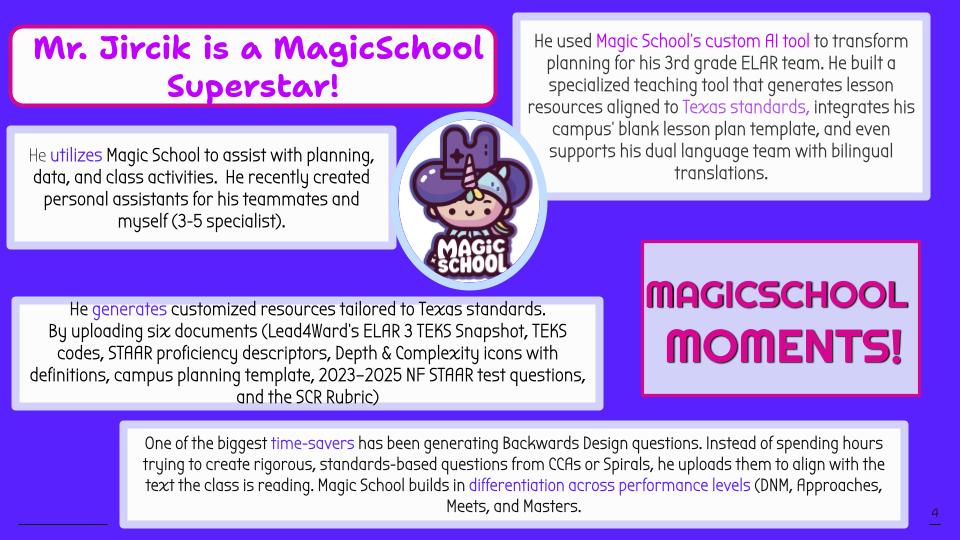
A newsletter graphic titled "Mr. Jircik is a MagicSchool Superstar!" highlighting how a 3rd grade ELAR teacher uses MagicSchool. Top left: He utilizes MagicSchool for planning, data, and class activities, and created personal assistants for his teammates and specialist. Top right: He used MagicSchool’s custom AI tool to transform lesson planning, generating resources aligned to Texas standards, integrating lesson plan templates, and supporting bilingual translations. Bottom left: He generates customized resources by uploading documents such as TEKS snapshots, STAAR proficiency descriptors, Depth & Complexity icons, and STAAR test questions. Bottom right: MagicSchool saves time by generating Backwards Design questions, aligning with student reading levels, and building in differentiation across performance levels (DNM, Approaches, Meets, Masters). Center: MagicSchool cartoon mascot with a wizard hat. Bottom right corner text reads MagicSchool Moments! with a purple background.
Try Station Rotations Here!
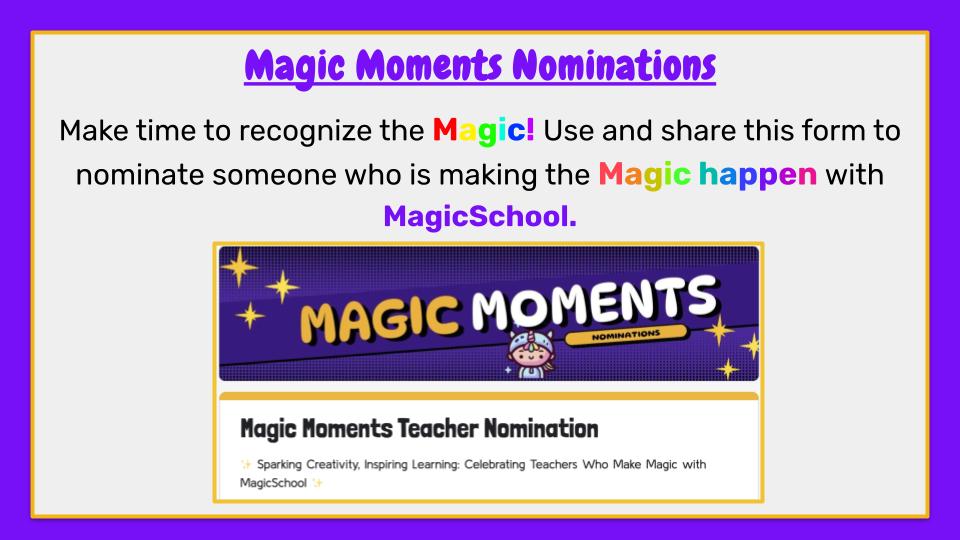
Form link to nominate a teacher for magicmoments

MagicSchool Leaderboards

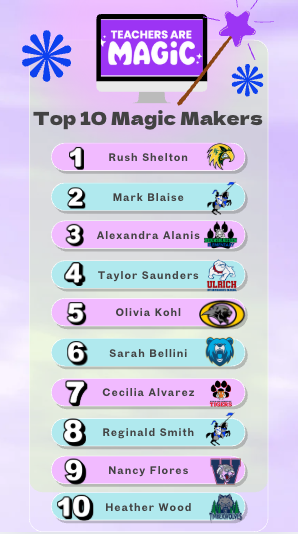
A colorful leaderboard graphic with the title "Top Teachers Top Tools." On the left, a list titled Top 10 Magic Makers highlights teachers: 1. Rush Shelton, 2. Mark Blaise, 3. Alexandra Alanis, 4. Taylor Saunders, 5. Olivia Kohl, 6. Sarah Bellini, 7. Cecilia Alvarez, 8. Reginald Smith, 9. Nancy Flores, 10. Heather Wood. In the center, large text reads Leaderboard.
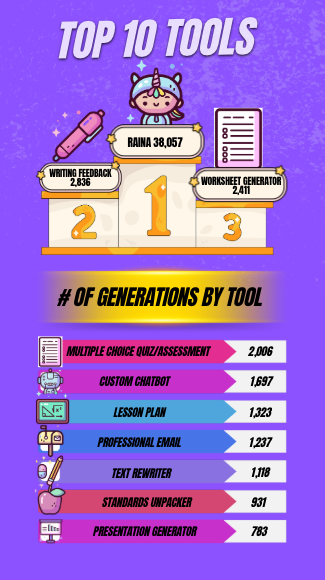
a section titled Top 10 Tools shows Raina with 38,057 uses ranked #1, followed by Writing Feedback with 2,336 uses, and Worksheet Generation with 2,411 uses. Below, a chart of additional tools by number of generations: Multiple Choice Quiz/Assessment (2,006), Custom Chatbot (1,597), Lesson Plan (1,323), Professional Email (1,237), Text Rewriter (1,118), Standards Unpacker (937), and Presentation Generator (783). The design uses pink and purple tones with cartoon icons and a MagicSchool mascot.
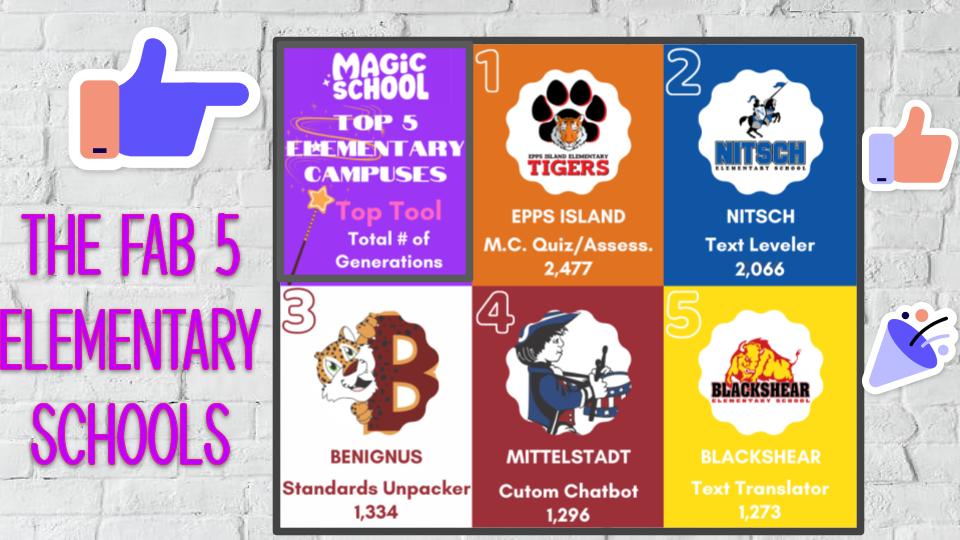
Graphic showing the Top 5 Elementary Schools for "Magic School" use. The schools, ranked 1 to 5, are Epps Island, Nitsch, Benignus, Mittelstadt, and Blackshear, along with their top tool and total generations used.
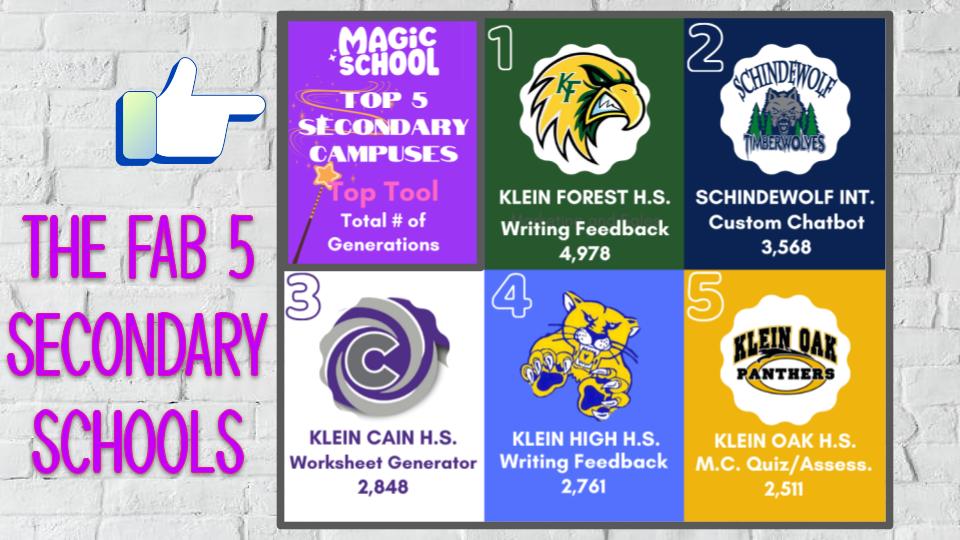
Graphic showing the Top 5 Secondary Schools for "Magic School" use. The schools, ranked 1 to 5, are Klein Forest H.S., Schindewolf Int., Klein Cain H.S., Klein High H.S., and Klein Oak H.S., along with their top tool and total generations used.

Library Events and Resources

Supporting Discourse with Blended Learning

Support our youngest learners with Seesaw and the new Reading Fluency Assessment feature for teachers.

Reading Fluency uses AI to allow teachers to capture reading fluency by tracking key metrics like percent words correct, words correct per minute, word additions, word removals, and more. English and Spanish languages are supported.

Everyone has access to Kami where you can Enhance blended and personalized learning.

  • Improve instruction and comprehension through multimedia comments that combine text, audio, and visuals.

  • Enable students to strengthen language skills with voice and video comments for practice and assessment.

  • Support vocabulary development with a multilingual dictionary offering definitions in both English and Spanish.

  • Boost listening comprehension at every learner’s pace with Read Aloud, with customizable speed and voice options.

Upcoming Trainings

All October Weekends and Fall Break!

🎃 PL – Digital Learning: The Great Pumpkin PD: Magic School Edition 🎃

Unlock your AI superpowers this fall! 🌟 In this self-paced Schoology Course, you’ll learn to use Raina & MagicSchool tools, write effective prompts, explore AI literacy & safety, and create custom tools.

🍂 Open: Weekends in October + Fall Break

Earn: Up to 4 Exchange Day Hours

Work at your own pace, grow your AI skills, earn Exchange Day hours, and bring a little magic to your classroom! 🪄 Register Here!

The Great Pumpkin PD
Techpalooza graphic

Tech Palooza 2025 - Unleash Your Digital Superpowers!

Join us on Saturday October 25, from 8:30 AM-12:30 PM for hands-on learning and innovation at TechPalooza!

This year’s event will spotlight powerful digital tools for teaching and learning- including Kami, MagicSchool, Seesaw, ClearTouch, & HMH (Amira, Writable & Waggle)!

REGISTER HERE!