Family Newsletter for the week of December 15-19, 2025 |
|
|
-12/17/25: Strack PTO Spirit Night @ Pizza Zone
- 12/18 /25: Semester 1 Pep Rally -12/18/25: Strack PTO Spirit Night @ Pizza Zone -12/19/25: Holiday Assemblies - morning -12/19/25: Quarter 2 Incentive Parties - afternoon -1/14/26: 8th grade High School Visits Field Trip -1/14/26: Cougar Course Selection Night @ Strack 5:30-7:00 pm -1/28/26: Mandatory Parent & Athlete Cheer Try Out Meeting @ 6 PM (Option 1) -2/4/26: Mandatory Parent & Athlete Cheer Try Out Meeting @ 6 PM (Option 2) -2/19/26: Strack Rededication, Strack Fest, and Open House -2/23/26: Cheer Try Out Clinic 4:30-6:30 PM -2/24/26: Cheer Try Out Clinic 4:30-6:30 PM
-2/25/26: Cheer Try Outs 4:30-8:00 PM -2/26/26: Cheer Try Outs 4:30-8:00 PM |
Join in our Holiday Spirit Days! |
|
|
We’re proud to honor Cougars each week who lead with heart and show our RISE values in action. These students embody what it means to be a Strack Cougar—showing Resilience, Integrity, Self-Discipline, and Empathy. Way to go, Cougs! |
|
|
6th Grade: Johandry BC. 7th Grade: Johan AC. 8th Grade: Makayla M. |
|
|
Congratulations to our Cougar Teacher of the Month, Ms. Va'Kendia Thomas! Ms. Thomas is our Cougar Teacher of the Month, and we are so proud to celebrate her. She is a strong and steady presence on our 6th grade math team, and her students absolutely adore her. Though she is quiet, her leadership in the classroom and in PLC shines through in the way she supports her team and creates meaningful learning experiences. She is always looking for fun, creative ways to help her students connect with math, and the impact she makes each day is felt by everyone around her. Congratulations, Ms. Thomas!
Congratulations to our Cougar Para of the Month, Ms. Nicole Loney! Our Para of the Month is Nicole Loney, and this recognition could not be more deserved. Ms. Loney serves across multiple ELA and Social Studies classrooms, and no matter where she is, she brings hard work, heart, and a willingness to jump in wherever help is needed. She builds strong, genuine relationships with both teachers and students, and it shows. In fact, when a few of our students found out she had been selected, they were so excited for her that they asked to be part of the celebration. That itself speak to how much she is loved and appreciated.. We are so grateful for you, Ms. Loney!
|
|
| The applications for the College Programs now open for 8th Graders! |
Applications for the College Programs in Klein ISD are now open for 8th grade students! Some of these programs offer an associate's degree along with an industry based certification. Click the links below to learn more. Applications are due on February 1st. Here are the available programs in Klein ISD: |
|
|
8th Grade High School Visits |
Our 8th graders will soon be visiting their zoned high schools, Klein Collins or Klein High, to help them begin preparing for the transition to 9th grade. Students will attend the high school that corresponds to the home address listed in Skyward. They will travel by bus to and from the high school and will have the opportunity to explore a variety of classrooms, programs, and spaces to get a feel for what each school offers.
If you do not want your child to participate in the high school visit, please complete the opt-out form HERE. If you have questions, please reach out to Mrs. Marino, 8th grade Assistant Principal. |
|
|
| Transitions in Our Strack Clinic |
We want to share that our wonderful Nurse, Nicholas Rye will be relocating out of state at the end of December. We are so grateful for his care, kindness, and contributions to Strack. At the same time, we are excited to welcome our new Strack Nurse, Michelle Johnson. Nurse Johnson joins us with outstanding recommendations and brings experience from both public and private school nursing experience. We are thrilled to have her join our Cougar family! |
|
|
Quarter 2 Incentive Parties. Paws for Success! |
December 19th, 2025, will be our next Paws for Success Quarter 2 incentive party. We are adjusting criteria slightly for students to be able to participate. Students must meet THREE of the four criteria below |
- No Referrals for Quarter 2
- No Tardies for Quarter 2
- No unpaid school fees
- Perfect Attendance in Quarter 2
|
|
|
Expedited Early Dismissals/Attendance Reminders |
|
|
To expedite early dismissals, please submit requests on the morning of the day the early dismissal is needed by any of the following methods: -Submit the request through Skyward -Send a note with your child to turn into the Attendance Office -Send your request by email -Or leave a voicemail message (may be delayed due to office traffic)
Please be sure to include the pickup time and the name of the person picking up the student (if other than yourself), as well as a driver’s license for verification. Instructions to Submit an Attendance Request through Skyward: Step-by-Step Instructions
Log In: Access your Skyward Family Access account using your Klein Network credentials. Go to Attendance: Click on the “Attendance” tile or tab. Add Request: Select the “Absence Requests” tab and click on “+ Add Absence Request” or “Add Absence Request.” Enter Dates and Times:
Enter the start and end dates of the absence. If the absence is for the entire day, check the “All Day” box. If it’s a partial day, uncheck “All Day” and enter the specific start and end times. If it’s for early dismissal, use this section to specify the dismissal information.
Select Reason: Choose the appropriate reason from the “Attendance Reason” dropdown menu. Add Details: Type any additional information in the “Comment” box. If someone will be picking up the student on your behalf, include their name here. Save: Click the “Save” button to submit the request to the school’s attendance office for review and approval.
You’ll be able to check the status of your request to see the final outcome. https://www.skyward.com/support/parents-and-students/family-access-toolkit/parents/power-up-absence-requests
Please note that parent/guardian emails are not acceptable forms of absence correspondence. Parent/guardian notes must be submitted using the Skyward family access portal or by sending a signed written note within 5 days from the absence. Doctor notes, however, may be submitted by email, fax, sent to the attendance office within 5 days from the absence. Cutoff time for early dismissals is 3:25 pm. |
| Para agilizar las salidas anticipadas, por favor envíen las solicitudes la mañana del día en que se necesite la salida, por cualquiera de los siguientes medios: -Enviar la solicitud a través de Skyward -Enviar una nota con su hijo(a) para entregarla en la Oficina de Asistencia -Enviar su solicitud por correo electrónico -O dejar un mensaje telefónico (puede haber demoras debido al tráfico en la oficina)
Asegúrese de incluir la hora de recogida y el nombre de la persona que recogerá al estudiante (si no es usted mismo), así como una licencia de conducir para verificación. Instrucciones para enviar una solicitud de asistencia a través de Skyward: Instrucciones paso a paso Iniciar sesión: Acceda a su cuenta de Skyward Family Access usando sus credenciales de la Red Klein. Ir a Asistencia: Haga clic en el recuadro o pestaña “Attendance” (Asistencia). Agregar Solicitud: Seleccione la pestaña “Absence Requests” (Solicitudes de Ausencia) y haga clic en “+ Add Absence Request” o “Add Absence Request”. Ingresar Fechas y Horas: Ingrese las fechas de inicio y fin de la ausencia. Si la ausencia es todo el día, marque la casilla “All Day” (Todo el día). Si es parcial, desmarque “All Day” e ingrese las horas de inicio y fin específicas. Si se trata de una salida anticipada, use esta sección para especificar la información de la salida.
Seleccionar Motivo: Elija el motivo correspondiente en el menú desplegable “Attendance Reason” (Motivo de Asistencia). Agregar Detalles: Escriba cualquier información adicional en el cuadro de “Comment” (Comentario). Si alguien recogerá al estudiante en su nombre, anote su nombre aquí.
Guardar: Haga clic en el botón “Save” (Guardar) para enviar la solicitud a la oficina de asistencia de la escuela para su revisión y aprobación.
Podrá revisar el estado de su solicitud para ver el resultado final.
https://www.skyward.com/support/parents-and-students/family-access-toolkit/parents/power-up-absence-requests
Tenga en cuenta: Los correos electrónicos de los padres o tutores no son formas aceptables de justificar una ausencia. Las notas de los padres o tutores deben enviarse a través del portal Skyward Family Access o mediante una nota escrita y firmada dentro de los 5 días posteriores a la ausencia.
Las notas médicas, sin embargo, pueden enviarse por correo electrónico, fax, o entregarse en la oficina de asistencia dentro de los 5 días posteriores a la ausencia. La hora límite para salidas anticipadas es a las 3:25 p.m. |
|
|
Stay connected with Strack PTO! Follow us on Facebook, Instagram, and TikTok @strackpto for the most up-to-date information on events, news, and ways to get involved. |
|
|
Important Update on Student Behavior Expectations and Fighting |
|
|
Updated Personal Communication Device Procedure & Consequences for 2025-26 (Repeated Info) |
|
|
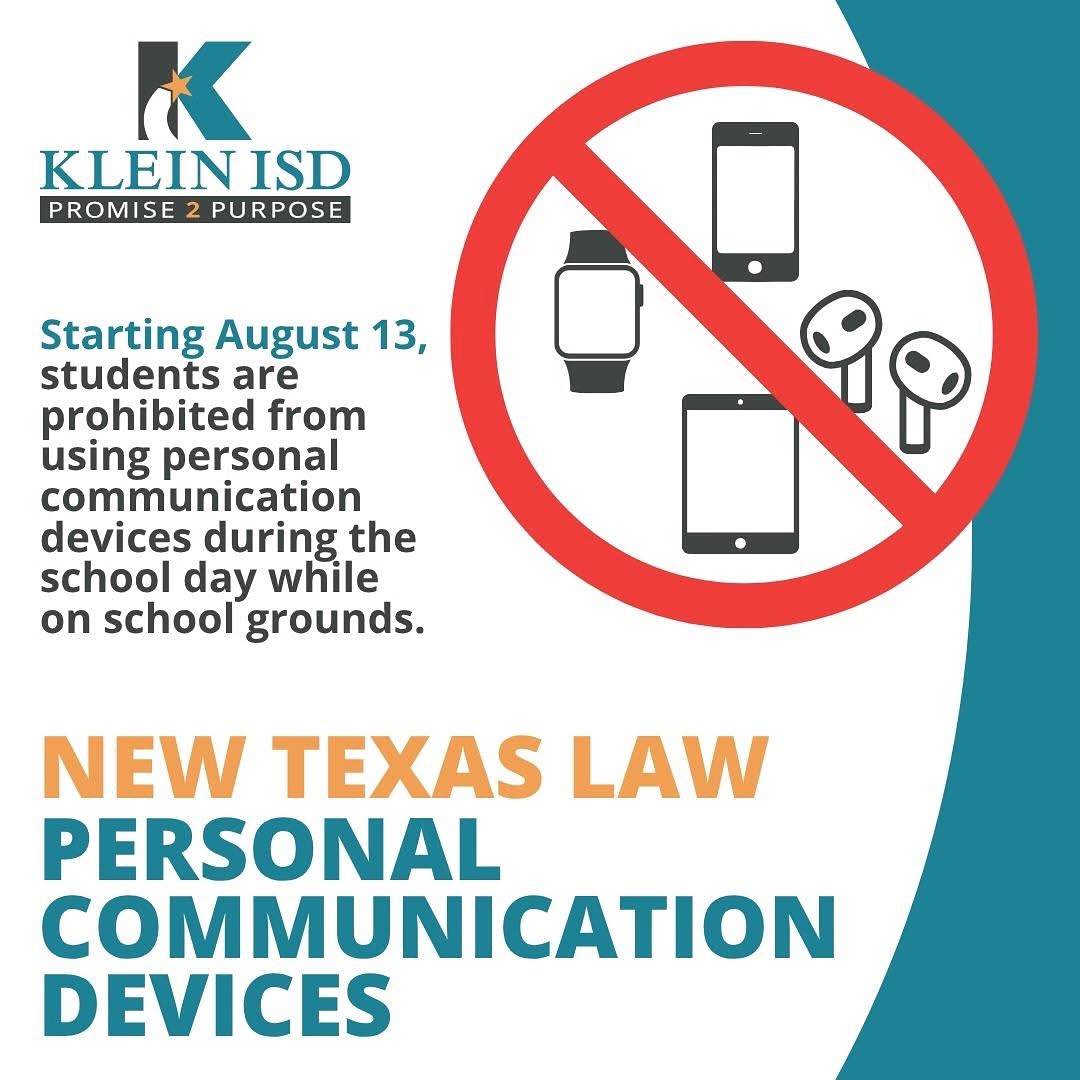
Starting with the 2025–2026 school year, a new Texas state law (House Bill 1481) prohibits students from using personal communication devices—such as phones, smartwatches, earbuds, and tablets—during the instructional day while on school grounds. Devices must be turned off and stored out of sight in a backpack or bag from the first bell to the end of the school day, including during passing periods, lunch, and recess.
Violations require disciplinary action. Families are encouraged to discuss this law with their children before the first day of school on August 13th. Schools will also review expectations and consequences with students to support a focused and positive learning environment. |
|
As a reminder, in compliance with new Texas law HB 1481, all devices must remain put away during the school day. Repeated offenses will result in escalating consequences:
1st Offense – Device turned in to grade-level office, admin conference, parent contacted. Student may pick up device from the admin office at the end of the day.
2nd Offense – Device turned in, consequence may include lunch detention or after-school detention, parent contacted. Student may pick up device from the admin office at the end of the day. 3rd Offense – Device turned in, one day of ISS, parent contacted. Parent/guardian must pick up the device from the front office during school hours.
4th Offense & Beyond – Device turned in, consequence may range from 2 days ISS up to DAEP placement, parent contacted. Parent/guardian must pick up the device from the front office during school hours.
Thank you for helping us maintain a focused learning environment! |
|
|
Tardy Procedures (Repeated Info) Tardies are counted in total, per day, and reset each week. Once a discipline has been assigned it is the student's responsibility to reschedule due to a conflict. If you do not attend and miss your consequence, you may be given ISS immediately. Please see the disciplinary consequences below. 1-3: Warning 4: Lunch Detention 5: One Hour After School Detention 6: Two Hours After School Detention 7+ ISS (The number of days is determined by AP)
Student Dress Code (Repeated Info)
Strack follows a strict adherence to the Klein ISD Dress Code found in the student handbook. Free and Reduced Lunch (Repeated Info)
We encourage all families to apply for free or reduced lunch. You may do so by applying electronically at kisd.us/frmealapp to see if your student(s) qualify for free or reduced priced meals. Applications need to be filled out each school year, and we encourage you to fill out this year’s application now. Families will be notified with eligibility results within 10 business days.
|
|
Lunch Visitors (Repeated Info) To help maintain a safe and secure environment, we will not be able to accommodate lunch visitors this school year. We appreciate your understanding and support.
Food Deliveries (Repeated Info) To maintain a safe and smooth school day, we kindly ask that there are no food deliveries to students. We appreciate your support in helping everyone plan ahead and stay focused on learning!
Family Curriculum Guides (Repeated Info)
To help our families stay connected to what is going on, we want to share with a link to the KISD Curriculum Guide. This provides and overview of the instruction that students receive as we teach the Texas Essential Knowledge and Skills (TEKS). This information includes questions you can ask your child and ways you can support their learning at home. Support at home is a critical piece of our students' success.
|
|
|
Mr. Kyle Valdez
7th Grade Assistant Principal
832-249-5411
kvaldez1@kleinisd.net |
| Ms. Sonya White
7th Grade Counselor
832-249-5430
swhite4@kleinisd.net |
|
Ms. Betty Pressly-Abbey
7th Grade Secretary
832-249-5416
bpresslyabbey1@kleinisd.net |
|
|
Ms. Kelsey Marino
8th Grade Assistant Principal
832-249-5412
kmarino1@kleinisd.net |
| Ms. Priscilla Hurst
8th Grade Counselor
832-249-5431
phurst1@kleinisd.net |
| |
|
Ms. Latoshia Young
Attendance Secretary
832-249-5400
lyoung1@kleinisd.net |
| Mr. Nicholas Rye
Nurse
832-249-5405
nrye1@kleinisd.net |
| Mr. Tywain Myles
Campus Athletic Coordinator
832-249-5440
tmyles1@kleinisd.net |
|
|
Ms. Priscila Petersen Academic Lead Facilitator
832-249-5400
ppetersen1@kleinisd.net |
|
Ms. Sarah Duncan ARD Committee Manager 832-249-5424 sduncan1@kleinisd.net |
| Ms. Crystal Prophet Registrar
832-249-5400
cprophet2@kleinisd.net
|
|
|
|